REVIEW · ACROPOLIS OF ATHENS
Athens: Acropolis Ticket with Multilingual Audio Guide
Book on GetYourGuide →Operated by Clio Muse Tours - Greece · Bookable on GetYourGuide
Seeing the Acropolis without rushing feels great. A timed e-ticket plus offline audio helps you move at your speed through the big sights, from the Propylaea to the Parthenon. What I like most is the practical setup: you choose your entry time, download the app once, and then use headphones to follow along hands-free.
The second win is what the audio actually does for you while you walk. It covers key stops and adds context that turns scattered stones into a story, including details tied to the marble transport and what you’re looking at near the main viewpoints. One possible drawback: it’s on you to start at the correct entrance/gate for the audio to match your position, and a low battery can turn your day into guesswork.
In This Review
- Key things to know before you go
- Timed e-ticket and offline audio: why this setup works
- Where to start: Dionysiou Areopagitou and finding the right gate
- Your walking route: Propylaea, Parthenon, Erechtheion, Belvedere
- Propylaea: the grand entry and a statue story
- Parthenon: the icon, explained without the lectures
- Erechtheion: Athena’s temple and the details you’d miss
- Belvedere viewpoint: the big Athens moment
- The Acropolis Classic audio tour: how to use it smoothly
- Choose headphones and plan battery life
- Expect the “timing gap” problem
- Device compatibility matters
- Language choices: pick carefully
- The bonus Athens city tour audio: when it’s worth your time
- Price and value: why $53 can feel fair (or not)
- Practical stuff that can trip you up (and how to avoid it)
- Download before you go
- Don’t start at the wrong entrance
- Take your time with photo stops
- Uphill walking is part of the deal
- Rules: pets and strollers
- Who should book this timed audio ticket
- Should you book this Acropolis e-ticket with audio?
- FAQ
- How long is the Acropolis Hill visit with this ticket?
- How do I choose my entry time?
- Where does the self-guided audio tour start?
- Is there a live guide included?
- What languages are available for the audio guide?
- Do I need Wi‑Fi on the hill?
- Is this experience wheelchair accessible?
- What phones/tablets are not compatible with the audio guide?
- Are tickets refundable?
Key things to know before you go

- Timed e-ticket helps you get in with less waiting than showing up and lining up first.
- Offline audio + text + maps means you’re not stuck hunting for Wi‑Fi on the hill.
- Acropolis Classic audio is designed to line up with your walk, from early gates to the Parthenon area and beyond.
- Multilingual narration is available in several languages, but you’ll want to confirm how it’s selected for your device.
- Expect uphill walking and crowds, so build in a little extra time for photo stops and pauses.
- Your phone matters: device compatibility and battery life can make or break the experience.
Timed e-ticket and offline audio: why this setup works

For many people, the Acropolis is less about one perfect photo and more about managing time. Lines can eat your morning, and the hill is not designed for slow detours. This experience tackles that by bundling two things that matter on-site: a time-slotted e-ticket for Acropolis Hill, and a self-guided audio tour you can download for offline use.
You’ll get to enter using your e-ticket QR code at the Acropolis Hill area, then follow the audio route at your own pace. That matters because the Acropolis is crowded and full of bottlenecks. With audio, you can pause at a viewpoint, back up a minute, or skip ahead when you’re moving through a tight passage.
Also, the content isn’t just facts. The narration mixes art and daily life in ancient Athens with what you’re looking at right in front of you—so you don’t need to stop and read a dozen signs you might miss anyway. The goal here is simple: help you understand the place while you’re still in it.
A few more Acropolis Of Athens tours and experiences worth a look


Where to start: Dionysiou Areopagitou and finding the right gate
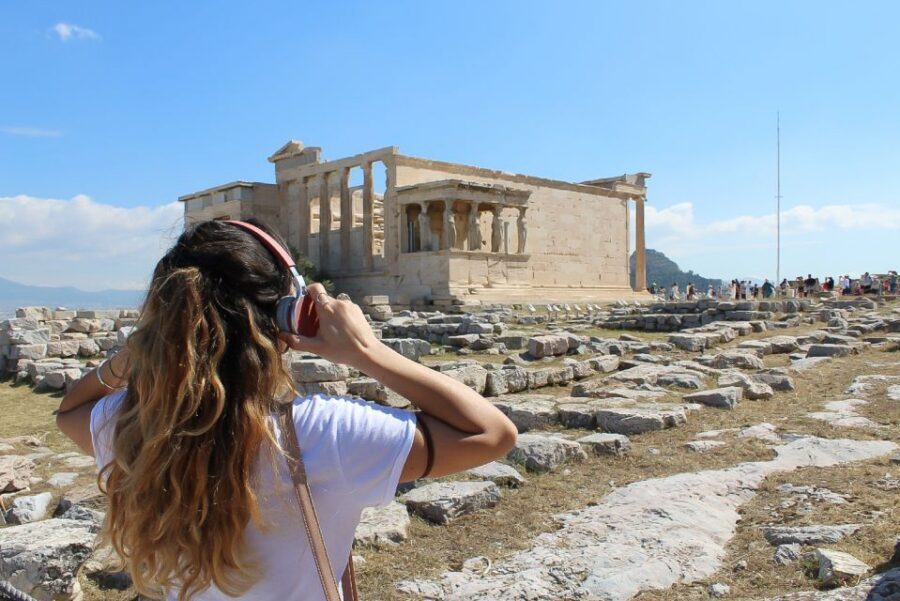
The self-guided audio tour starts at the entrance to Acropolis Hill on Dionysiou Areopagitou. This street is also the practical pathway from the metro area, and that’s useful because navigating by landmarks on the hill can get confusing fast.
Here’s the key mindset: don’t treat this as a “show up anywhere and press play.” The audio is meant to line up with where you enter. If you head to the wrong entrance area, you can end up with narration that doesn’t match what you’re seeing. In the real world, that’s when people get stressed.
Practical tip: aim to arrive a bit early for your time slot, then take 5 minutes to confirm you’re at the correct entrance area before you start the audio. Even if you’re late by a few minutes, the bigger issue is usually orientation, not punctuality.
Your walking route: Propylaea, Parthenon, Erechtheion, Belvedere

This is a self-paced route, but the audio guides you through the signature parts of the Acropolis. Plan on a mix of stairs, uneven stone, and packed crowds—so your “4.5 hours” is more like a full morning/afternoon block.
Propylaea: the grand entry and a statue story
Your route kicks off near the main gateway area. The audio highlights the Propylaea and includes a specific detail about a statue connected to Socrates—an example of how the narration uses individual moments to make the architecture feel human.
Why this stop matters: the Propylaea sets the scale. Before you hit the Parthenon, you need that “oh wow” moment, and the gate framing makes it easier to understand why the Acropolis is so visually commanding.
Parthenon: the icon, explained without the lectures
The Parthenon is the obvious highlight, but the value is in what you learn while you’re standing there. The narration walks you through what you’re seeing and includes connections like how marble was transported—so the building doesn’t feel like it appeared by magic.
Real-life advantage: you’ll likely take photos, but audio helps you keep moving between viewpoints with purpose. Instead of repeating the same angle for 20 minutes, you can shift your position and follow the story.
You can also read our reviews of more guided tours in Acropolis Of Athens

Erechtheion: Athena’s temple and the details you’d miss
Next up is the Erechtheion, described as a temple dedicated to Athena. This section tends to be where people either slow down (because it’s visually different and more textured) or rush (because they’re itching to get to the views).
Let audio pace you here. Even if you only catch a portion of the narration, it gives you a framework for what the building was for, not just how it looks.
Belvedere viewpoint: the big Athens moment
The audio finishes with jaw-dropping views from the Belvedere viewpoint area. This is the payoff for the climb. It’s also a reality check: from above, Athens looks like layers—ancient stone sitting inside a modern city.
If crowds are thick, you may not get your own perfect spot for long. The audio makes it easier to accept that and still get something meaningful out of the moment.
The Acropolis Classic audio tour: how to use it smoothly

You’ll download the “Acropolis Classic” audio tour to your smartphone. The package includes offline text, audio narration, and maps, which is exactly what you want on the hill where connectivity can be unreliable.
Choose headphones and plan battery life
Headphones are listed as what you should bring, and that matches how most people experience this type of tour. You’ll need a charged phone more than you think. One small tech reality: if your battery is low, you may end up switching to the text component only, which is still helpful, but it changes the experience.
If you travel with a power bank, this is a situation where it can be genuinely useful—because you’re on a phone for audio and maps the whole time.
Expect the “timing gap” problem
This is self-guided, but crowds can still mess with flow. If people ahead of you are pausing at the same points, you might find the narration moves faster than your feet. That’s fixable: use the controls to replay the previous part or wait until you catch up.
Device compatibility matters
The audio guide is not compatible with:
- Windows Phones
- iPhone 5/5C or older
- iPod Touch 5th gen or older
- iPad 4th gen or older
- iPad Mini 1st gen
Before you go, check your model. This avoids the most annoying kind of disappointment: arriving at the gate with no working audio.
Language choices: pick carefully
Audio languages include English, Spanish, French, Greek, German, Italian, and Chinese. One practical note from real use: it may not be possible to assign different languages within the same booking the way you expect. If you’re traveling as a group with different language needs, decide who leads with which language before you arrive, and keep expectations realistic.
The bonus Athens city tour audio: when it’s worth your time

The ticket includes two self-guided audio tours. One is the Acropolis experience. The other is an Athens city-centre audio guide, included with the same download/app setup.
This bonus makes most sense if you’re planning more than just the hill. If you have an afternoon or evening in central Athens, the city audio can help you connect neighborhoods and landmarks without paying for another guided session.
If you’re short on time, you can still treat it as a “later tonight” resource. After the Acropolis, it’s easier to understand what you’re seeing around you when you have a simple audio roadmap.
Price and value: why $53 can feel fair (or not)
This experience is priced at about $53 per person and lasts around 4.5 hours. The cost is not just for audio. You’re paying for a time-slotted e-ticket to Acropolis Hill plus two offline audio tours.
Here’s how I think about value:
- If you hate ticket lines and want to spend your energy walking, the timed entry piece is the main value driver.
- If you want explanation without a live guide’s schedule, the offline narration gives you control and repeatability.
- If you also plan to explore Athens afterward, the included city audio boosts what you get per hour.
On the flip side, if you prefer a human guide, or if your phone/audio setup is uncertain, you might end up feeling like you bought technology more than knowledge. In that case, you’ll want either a rock-solid download beforehand or a backup plan.
Practical stuff that can trip you up (and how to avoid it)
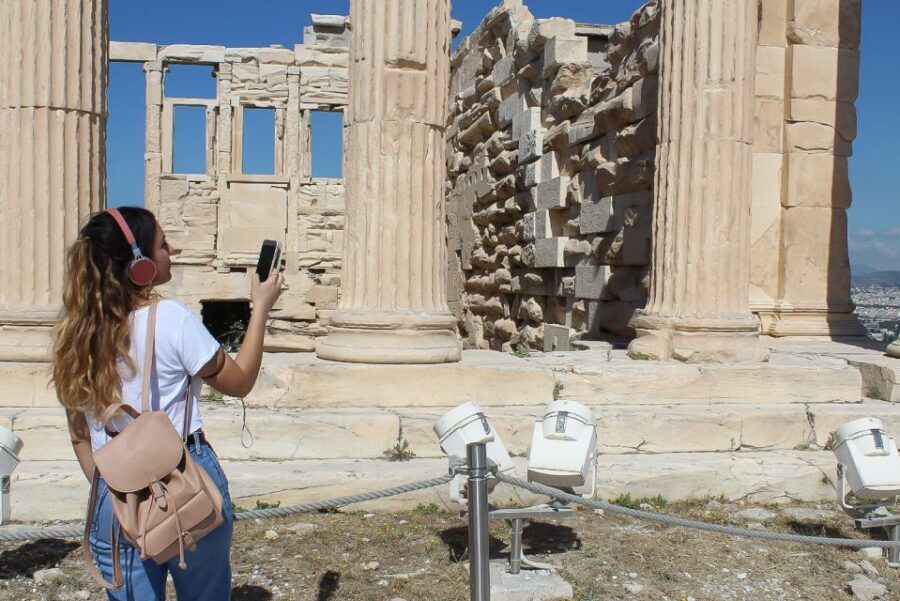
A smooth visit comes down to small choices.
Download before you go
Offline audio, maps, and text are included, but you still need to download the content ahead of time in a good connection area. On the hill, signal can be spotty, and you don’t want your “easy morning” turning into error screens.
Don’t start at the wrong entrance
Several people run into the same problem: they enter from the wrong side and the audio doesn’t match the view. Before you hit play, confirm you’re at the correct entrance area on Dionysiou Areopagitou.
Take your time with photo stops
The route includes iconic viewpoints and architectural details. Crowds mean you won’t always get your ideal angle, and it’s easy to lose time negotiating space. Build in slack so you don’t feel rushed by the audio pacing.
Uphill walking is part of the deal
This involves some uphill walking. The audio tours are self-guided, so you can stop whenever you want, but you should still plan for stairs and effort. If you’re managing mobility, consider that the experience is listed as wheelchair accessible, but the site itself is still a complex historic area.
Rules: pets and strollers
Pets are not allowed, and baby strollers are not allowed. Plan accordingly if you’re traveling with kids.
Who should book this timed audio ticket

This experience fits best if:
- You want the freedom of a self-guided visit rather than a group schedule.
- You value understanding what you’re seeing while you walk.
- You’re okay using your phone as the main guide.
- You’d rather spend your time on viewpoints than waiting in lines.
It may not be your best pick if your group has limited phone compatibility, if you can’t reliably charge your device, or if you want a live Q&A conversation. In those cases, audio can still be useful, but it won’t replace that human interaction.
Should you book this Acropolis e-ticket with audio?

If you’re aiming for an efficient, flexible Acropolis day, I think this is a smart booking. The timed e-ticket plus offline audio is exactly how you protect your time at a place that’s easy to overwhelm with crowds and confusion. You’ll get the major stops—Propylaea, Parthenon, Erechtheion, and Belvedere—with narration that helps you make sense of the stones as you look at them.
Book it if:
- You’re comfortable with smartphone navigation and headphones.
- You can download offline content beforehand.
- You want to go at your own pace and replay details when something catches your eye.
Skip it (or consider an alternative) if:
- Your device isn’t compatible with the app.
- You don’t want to rely on phone audio at a major site.
- Your group’s language needs are complicated and you want total flexibility in one booking.
FAQ
How long is the Acropolis Hill visit with this ticket?
The duration is listed as 4.5 hours. That gives you time to enter using your time slot and walk the audio route at your own pace.
How do I choose my entry time?
You receive an email from the provider with a BookingPage URL. Use that page to make your binding selection for the Acropolis Hill time slot.
Where does the self-guided audio tour start?
The audio tour starts at the entrance to Acropolis Hill on Dionysiou Areopagitou.
Is there a live guide included?
No. This is a self-guided experience with downloadable audio and text.
What languages are available for the audio guide?
The audio guide is available in English, Spanish, French, Greek, German, Italian, and Chinese.
Do I need Wi‑Fi on the hill?
The package includes offline text, audio narration, and maps for your smartphone. You should still plan to download the audio in advance in a place with a good connection.
Is this experience wheelchair accessible?
Yes, it is listed as wheelchair accessible.
What phones/tablets are not compatible with the audio guide?
It is not compatible with Windows Phones, iPhone 5/5C or older, iPod Touch 5th gen or older, iPad 4th gen or older, and iPad Mini 1st gen.
Are tickets refundable?
No. The activity is non-refundable.