REVIEW · LINDOS
Lindos Acropolis Self-Guided Tour with 3D & Audio (No entry)
Book on GetYourGuide →Operated by Culture App · Bookable on GetYourGuide
A phone tour can turn ruins into a story. Lindos Acropolis is already special, but the real win here is offline audio paired with 3D reconstructions you can trigger as you walk. You’re not stuck in a loud group. You can stop, listen, and look when you feel ready.
What I like most: the audio narration is built to guide you through the site at your pace, and the media layers (3D, 360° views, and short videos) help you understand what you’re seeing instead of just staring at stone. One drawback to plan around: the tour app is only as good as your download prep. If the content doesn’t load on your device, you could end up with a frustrating visit—so you’ll want Wi‑Fi download and enough storage ahead of time.
In This Review
- Quick take
- Why Lindos Acropolis fits a self-guided audio tour so well
- No-entry ticket: what this $8 tour includes (and what it doesn’t)
- Getting there: bus to the archaeological area, then a 15-minute walk
- Your phone tour route: streets, sanctuary spaces, and Athena context
- Approaching Lindos Acropolis with guided orientation
- Focusing on the sanctuary of Athena
- Seeing Hellenistic-period sanctuary life through ruins
- Fortifications and the “why here” factor
- AR, 3D models, and 360° views: how to use the media without losing your place
- Offline-first convenience: download prep is the difference between great and annoying
- Price check: is $8 good value for Lindos Acropolis?
- Small gotchas to know before you go (based on real-world issues)
- 1) The app content may fail to load for some devices
- 2) Entrance tickets can be a separate problem from the app
- Who should book this Lindos Acropolis audio tour?
- Should you book this Lindos Acropolis tour?
- FAQ
- Is the entrance ticket included?
- Does it work offline?
- How long does the tour stay available?
- What languages are available?
- How much phone storage is needed?
- What equipment should I bring?
- How do I download the tour content?
Quick take

- Offline audio that works on site after you download the content on Wi‑Fi
- 3D and AR effects that help explain what parts of the sanctuary once looked like
- Athena-focused context for the Pan-Hellenic shrine and her regional cult center
- 360° views that make it easier to connect ruins to the surrounding coast and village
- No-entry setup: you still need to buy the Lindos Acropolis ticket separately
Why Lindos Acropolis fits a self-guided audio tour so well

Lindos Acropolis is one of those places where your first look is gorgeous, but your second look is where the meaning starts to click. The stone sits above Lindos village, and the view alone pulls you upward. Add the audio narration and 3D/AR visuals, and your phone becomes a quiet “second brain,” translating ruin shapes into a Hellenistic-era religious setting.
I also like that the tour is built for wandering. You’re free to move slowly through temple areas and fortification zones without feeling rushed or herded. That matters here, because the site rewards pauses: you’ll want time to compare what you see in front of you with what the reconstructions show on your screen.
Finally, the tour frames Lindos Acropolis as a real religious hub, not just a photo stop. You get context for the sanctuary of Athena and how this was a regional center of her cult—plus the feeling of how a typical Hellenistic-period sanctuary might have functioned.
You can also read our reviews of more guided tours in Lindos


No-entry ticket: what this $8 tour includes (and what it doesn’t)

This is a digital tour only. The $8 price is for the smartphone app tour, not the entrance ticket. At the site, you must purchase the Lindos Acropolis ticket separately (full price 20€, reduced 10€).
That split is the key to planning your day:
- If you arrive thinking the entry is included, you’ll need to scramble at the gate or ticket office.
- If you’re buying online, double-check the exact ticket type and whether it will be accepted at the access point. Some visitors have run into situations where tickets purchased elsewhere weren’t valid at the gate, forcing a second purchase on site.
So I’d treat the $8 as a low-cost add-on that improves your understanding, not as a replacement for admission.
Getting there: bus to the archaeological area, then a 15-minute walk
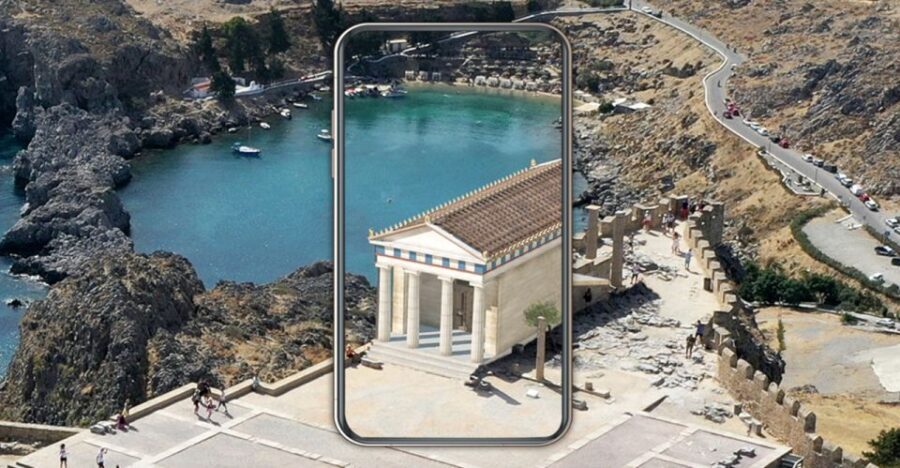
The audio tour starts at the Lindos Acropolis. The easiest route is public transport: take the local bus to the archaeological site area, then expect about a 15-minute walk to the Lindos Archaeological site.
This walk is part of the experience, not just the commute. As you climb, you’ll get a feel for why the Acropolis held so much importance—height matters for visibility, defense, and the sense of stepping into a sacred space.
Practical tip: plan your arrival time so you’re not trying to download and troubleshoot while you’re already sweaty on the hill. Download first, relax on arrival.
Your phone tour route: streets, sanctuary spaces, and Athena context

There isn’t a fixed “group schedule” because this is self-guided. Instead, think of it as chapters you trigger while you walk. The app leads you through what you’re looking at—temples, fortresses, and the stories tied to the site—so you’re not left guessing.
Here’s how the experience generally lands:
Approaching Lindos Acropolis with guided orientation
Early on, the audio helps you get oriented so you don’t just bounce between highlights. You’ll be guided through the ancient setting in a way that matches what you can actually see from where you’re standing.





Focusing on the sanctuary of Athena
A major payoff is the emphasis on the Pan-Hellenic shrine of Athena and how Lindos served as a regional center for her cult. When you hear that framework while standing near the temple ruins, the place stops feeling like random stacks of stone. It becomes a functioning religious space from the Hellenistic period, in the broad strokes the app is trying to show you.
Seeing Hellenistic-period sanctuary life through ruins
The tour’s goal is to help you understand what a typical religious sanctuary might have looked like in the Hellenistic era. Even if you’re not a history nerd, this kind of storytelling changes your scan pattern: you start noticing architectural elements and layout cues you would otherwise miss.
Fortifications and the “why here” factor
Because the app also covers fortresses, you’ll get more than temple talk. The site’s defensive and strategic logic becomes part of your understanding, not a side note.
AR, 3D models, and 360° views: how to use the media without losing your place

This is where the tour earns its keep. Lindos Acropolis includes 3D reconstructions and AR-style effects where the temple ruins can look more like they did in their working life. You also get 360° views, panoramas, and short videos—so you can connect ruins to sightlines.
How to make those features work smoothly in real life:
- Start with audio first. Let the narration place you in the story before you jump into screens.
- Use 3D/AR as comparisons, not replacements. When you lift your phone to view a reconstruction, take a moment to glance back at the real stone after.
- Pick one viewing point and commit. With 360° content, it’s easy to spin around and forget to enjoy the actual coastline and village below. Decide whether you want picture-perfect context or more time just looking.
One caution: phone batteries are fragile on a sunny hillside. Bring a charged device, and if you’re prone to fast drain, consider carrying a small external battery (not provided, just a smart hedge).
Offline-first convenience: download prep is the difference between great and annoying
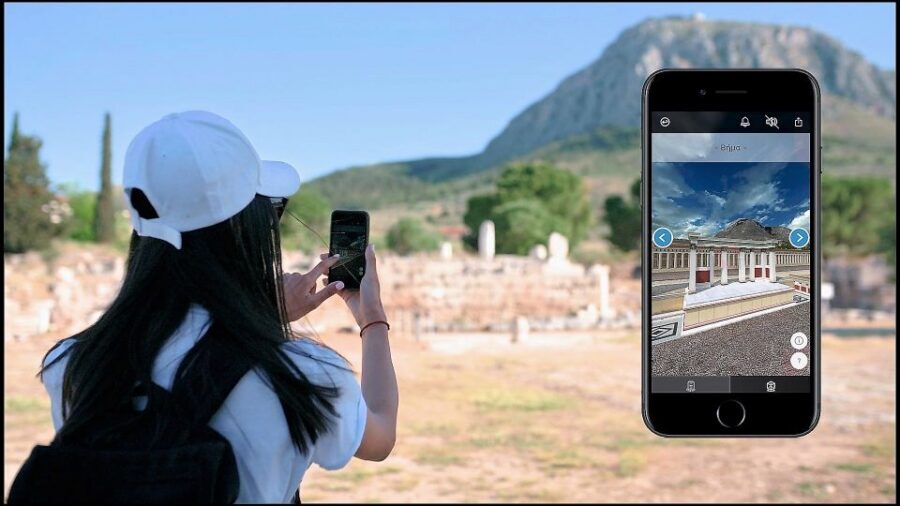
The tour is designed to be used without internet once you’ve downloaded it. After downloading the content, it works fully offline—no roaming fees and no hunt for signal.
But that offline promise comes with a clear requirement: you have to download the content while you have Wi‑Fi (recommended), and you’ll need about 200MB of storage on your phone.
I’d treat download as a non-negotiable step:
- Do it before your day at the Acropolis.
- Confirm you can open the content afterward, while still somewhere with Wi‑Fi available.
- Keep enough space free on your device for the app to load media.
Also plan for hardware basics. The tour requires:
- Headphones (or you’ll be competing with wind and distant tour noise)
- A smartphone with at least iOS 11.0+ or Android 5.1+
- A charged phone and a comfortable plan for sun and walking
One more thing: the provider sends instructions by email after booking, and those emails can land in spam. If you wait until you’re at the site, you’ll be more likely to run into a messy scramble.
Price check: is $8 good value for Lindos Acropolis?

At $8 per person, the best way to judge value is by what you get that you can’t easily replicate with a regular guidebook.
For a small add-on cost, you’re paying for:
- Audio narration in multiple languages
- 3D reconstructions, panoramas, and short videos
- Offline access, which is huge for islands where signal can be inconsistent
- An experience that you control, so you can pause whenever you need
Then add the unavoidable entrance cost: 20€ full / 10€ reduced for the Lindos Acropolis ticket. In other words, you’re building a total spend that still isn’t outrageous, but the entrance fee is the big line item.
So here’s my practical take: this tour is worth it when you want understanding, not just a view. If you mainly want photos and you already know the site, you might not feel the $8 as strongly. If you want your ruins explained in plain language and you’re happy to use a phone, it’s a good deal.
Small gotchas to know before you go (based on real-world issues)

Most digital tours go smoothly. Still, the Acropolis is not the time to troubleshoot.
Two issues matter for your planning:
1) The app content may fail to load for some devices
Some people have described a situation where the purchased audio/3D/360 features did not work at all—not just audio, but the visuals and even photos—despite trying mobile data and Wi‑Fi and using multiple devices. That’s not a typical outcome, but it’s serious enough that you should protect yourself.
My advice:
- Download on Wi‑Fi the moment you can after booking.
- Leave enough storage.
- Test that the tour content actually opens before you reach the hill.
- Keep headphones ready, and don’t rely on your phone speakers.
2) Entrance tickets can be a separate problem from the app
Remember: the app is not admission. Also, some visitors have reported that tickets bought online weren’t accepted at the gate, requiring a second purchase at the ticket office.
My advice:
- Confirm you’re buying the correct Lindos Acropolis admission.
- If you’re buying online, read what the ticket is meant to be used for at the access point.
- Keep a backup plan for a quick on-site purchase if needed.
If you handle those two risks with prep, your day should be calm.
Who should book this Lindos Acropolis audio tour?

This works best for travelers who:
- Want a self-paced visit without joining a group clock
- Learn better with audio narration plus visuals
- Prefer offline reliability over roaming data
- Like to understand ruins in context—especially the Athena sanctuary and Hellenistic-period atmosphere
It might be less ideal if you:
- Hate relying on your phone while walking
- Don’t download content ahead of time
- Are likely to get stuck if a tech feature fails at the worst possible moment
Also, language coverage is strong: the tour audio and text are offered in English, Greek, Spanish, Italian, French, German, Dutch, and Chinese.
Should you book this Lindos Acropolis tour?
If you’re coming to Lindos Acropolis for more than photos, I think it’s a smart buy. The combination of offline audio and 3D/AR support makes the ruins easier to read, and the Athena-focused storytelling helps you feel what the site was for.
Book it if you can do the boring prep well: download on Wi‑Fi, make sure you have around 200MB of free space, bring headphones, and arrive with a fully charged phone. Those few steps turn this from a nice idea into a smooth, satisfying walk.
Skip the tour if you’re mostly there for a quick snapshot circuit or if you know you won’t reliably manage downloads and battery. In that case, you may end up wishing you’d spent time on an on-site human guide or just used a simple offline map and your own curiosity.
FAQ
Is the entrance ticket included?
No. The tour is digital only. Entrance to the Lindos Acropolis must be purchased separately (full 20€, reduced 10€).
Does it work offline?
Yes. After you download the content, the app works fully offline on site, so you don’t need internet or roaming.
How long does the tour stay available?
It’s valid for 5 days from the first activation.
What languages are available?
Audio narration and text are available in English, Greek, Spanish, Italian, French, German, Dutch, and Chinese.
How much phone storage is needed?
You’ll need about 200MB of storage space on your phone.
What equipment should I bring?
Bring comfortable shoes, a sun hat, water, headphones, and a charged smartphone.
How do I download the tour content?
After booking, you’ll receive an email with instructions from the provider (Culture App). Download the content on Wi‑Fi before your visit.